

A business server can appear perfectly healthy while important problems develop in the background. Storage capacity gradually decreases, backup jobs begin failing, cooling systems become less effective, and software updates remain pending. Employees may not notice anything unusual until a shared application stops responding or an entire department loses access to its files.
For small and midsize businesses in Lodi, server downtime can affect customer service, accounting operations, internal communication, and access to essential company records. Preventing these interruptions requires more than replacing old equipment. Businesses need to understand which systems depend on their servers, recognize early warning signs, and establish maintenance procedures that address problems before they disrupt daily work.
This guide explains how to prevent business server failures in Lodi, what maintenance activities deserve attention, and how to determine whether an existing server environment needs professional support.
What Makes a Business Server Vulnerable to Unexpected Failure?
A server rarely operates in isolation. It may support employee logins, shared folders, accounting applications, business databases, network printers, and other services. A single technical issue can therefore affect several parts of the organization.
Consider a Lodi business where employees use one server to access shared financial documents and customer records. If the server’s storage drive begins developing errors, employees might initially experience slow file access. Later, applications may stop saving changes or become unavailable. Without monitoring, the business may discover the underlying problem only after an interruption occurs.
Several conditions can contribute to this situation:
- Aging hardware: Storage drives, memory modules, power supplies, and cooling components can deteriorate over time.
- Uncontrolled storage growth: Shared files, application databases, logs, and temporary data gradually consume available space.
- Unverified software updates: Updates can introduce compatibility issues when they are not reviewed and tested appropriately.
- Insufficient cooling: Restricted airflow, dust, or cooling equipment problems can affect server temperatures.
- Incomplete recovery arrangements: Backups may exclude important applications, configurations, or recently changed files.
- Unreviewed system changes: New applications, permissions, network configurations, or hardware additions can introduce unexpected dependencies.
- Limited performance visibility: Without monitoring, unusual resource consumption and recurring errors may go unnoticed.
“A server can still be running while its ability to support the business is already deteriorating.”
The important distinction is between a server that is switched on and a server that is healthy, supported, recoverable, and capable of handling its workload.
8 Preventive Maintenance Practices for Lodi Business Servers
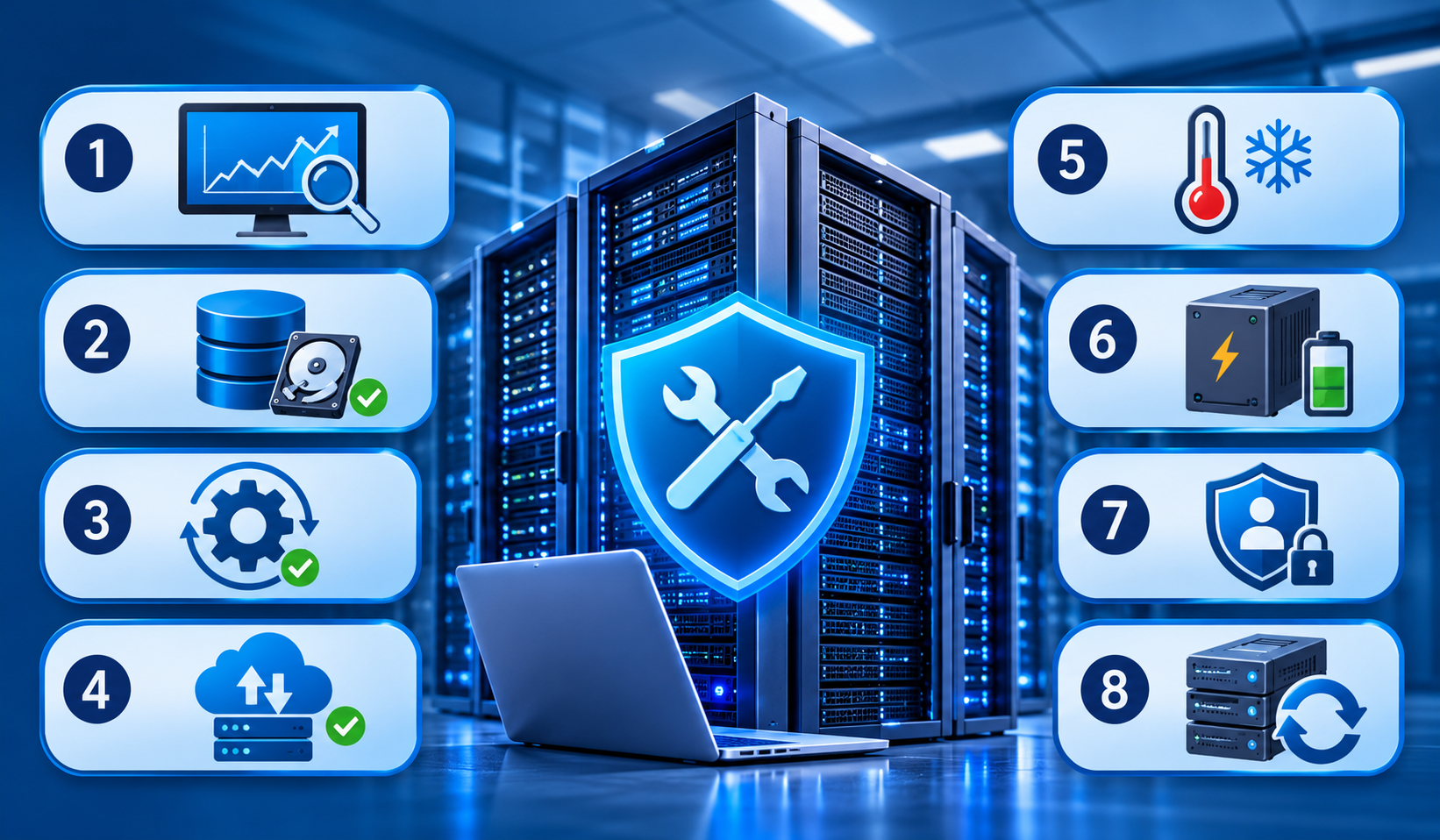
An effective server maintenance plan should address hardware, software, storage, access, and recovery together. The following practices provide a structured starting point for businesses that depend on local or cloud-connected server infrastructure.
1. Monitor Server Performance Against Its Normal Operating Pattern
A single performance reading rarely tells the complete story. A server may use more memory during a busy workday without having a problem. However, consistently increasing memory consumption, repeated disk errors, or unusual CPU activity may indicate that something needs investigation.
Rather than checking performance only when employees complain, establish a baseline for normal server activity.
Review:
- CPU and memory utilization during typical business hours.
- Available storage and changes in disk usage.
- Disk health alerts and system error logs.
- Network traffic and unexpected connection interruptions.
- Application response times and recurring service failures.
Compare current readings with previous weeks or months. For example, if a business application normally opens in seconds but increasingly takes several minutes, the change deserves investigation even if the server has not generated a critical alert.
2. Manage Storage Capacity Before It Affects Business Applications
Running out of server storage can create problems beyond the inability to save new files. Applications may fail to write temporary data, databases can encounter errors, and operating system updates may not complete.
For businesses in Lodi, storage planning should account for how quickly company information grows and which applications depend on available disk space.
A practical storage review should identify:
- Which folders and applications consume the most space.
- Whether database files are growing faster than expected.
- How much capacity business applications require.
- Whether old logs and temporary files can be safely removed.
- When additional storage or an upgrade may be necessary.
Set internal warning thresholds based on the server’s workload and available capacity. Do not wait until a drive is almost full before planning an upgrade.
Also, avoid deleting unfamiliar system files or business records without confirming their purpose and retention requirements.
3. Apply Server Updates Through a Controlled Maintenance Process
Delaying server updates can leave software defects and known security vulnerabilities unaddressed. On the other hand, installing updates without checking compatibility can interrupt applications that employees need to complete their work.
A controlled patch management process should include identifying available updates, reviewing their importance, checking compatibility, scheduling installation, and verifying the results.
Before a significant update:
- Identify the server, operating system, and applications affected.
- Review vendor documentation and known compatibility requirements.
- Confirm that current backups are available.
- Schedule the change during an appropriate maintenance window.
- Verify essential services and application access afterward.
- Document the update and any unexpected behavior.
The National Institute of Standards and Technology’s patch management guidance explains why organizations should treat patching as an ongoing preventive maintenance activity rather than an occasional task.
4. Verify That Business Backups Can Actually Restore the Server
A backup report showing successful completion does not necessarily mean the business can recover its entire server environment.
A file backup may protect documents but not include application configurations, databases, system settings, or other components required to restore operations. Businesses should understand exactly what each backup covers.
A useful recovery review asks:
- Which server data and applications are included?
- How frequently are backup copies created?
- Where are backup copies stored?
- Who can access or modify those copies?
- How long would restoration take?
- Has the recovery process been tested recently?
“The real measure of a backup is not whether a copy exists. It is whether the business can restore the information and systems it needs within an acceptable timeframe.”
For additional protection, businesses should consider isolated or otherwise protected backup copies and restrict access to backup administration accounts.
RJ PRO Tech Group also provides information about backup and disaster recovery for Lodi businesses.
5. Maintain the Physical Environment Around Server Equipment
Server maintenance is not limited to software dashboards. Physical conditions can affect equipment just as much as configuration problems.
A server installed in a small office room or storage area may experience restricted airflow, dust accumulation, or temperature fluctuations. These conditions can place additional stress on hardware.
Check:
- Whether ventilation openings remain unobstructed.
- Whether cooling equipment is functioning properly.
- Whether dust has accumulated around air intakes and exhaust vents.
- Whether cables and power connections are secure.
- Whether temperature alerts are configured where supported.
- Whether water, cleaning supplies, or unrelated office materials are kept away from equipment.
Businesses should follow equipment manufacturers’ environmental recommendations. A server should not be treated like ordinary office furniture that can be placed anywhere convenient.
6. Review Power Protection and Safe Shutdown Procedures
Unexpected power loss can interrupt active server operations. Depending on the application and what the system was processing, an abrupt shutdown may also create data consistency or recovery problems.
An appropriately sized uninterruptible power supply (UPS) can provide temporary power during an outage and allow supported equipment to shut down safely.
A power protection review should cover:
- UPS capacity relative to connected equipment.
- Battery health and replacement requirements.
- Automatic shutdown configuration where supported.
- Protection for essential networking equipment.
- Procedures for extended power interruptions.
- Periodic testing of the shutdown process.
A UPS is not a substitute for long-term backup power. Businesses should understand how much operating time it provides and what employees should do if an outage continues.
7. Control Server Access and Document Configuration Changes
Server access often changes as a business hires employees, introduces applications, or adjusts responsibilities. Without periodic reviews, former employees may retain accounts, unnecessary administrative privileges may remain active, and undocumented configuration changes can make troubleshooting difficult.
Establish a process for reviewing:
- Employee accounts and access permissions.
- Administrator accounts and privileged access.
- Remote access methods and authentication controls.
- Service accounts used by business applications.
- Changes to network settings and server configurations.
- Access removal when employees leave the organization.
Keep a record of significant changes, including who approved them and when they were completed. This makes it easier to investigate unexpected behavior and understand what changed before a problem appeared.
8. Plan Hardware Replacement Around Business Requirements
A server should not be replaced simply because it has reached an arbitrary age. However, waiting until equipment fails can leave a business with limited replacement options and an urgent migration project.
Review the server’s condition and support status before making an upgrade decision.
Consider:
- Hardware warranty and vendor support availability.
- Storage drive and memory health.
- Current processing and capacity requirements.
- Compatibility with essential business applications.
- Availability of replacement parts.
- Expected growth in employees, files, and application usage.
- Time and resources required for migration.
A planned replacement allows the business to evaluate options, test applications, transfer data, and verify access before retiring the old equipment.
Build a Server Maintenance Plan Around Business Priorities
Not every server needs the same maintenance schedule. A system hosting a business-critical accounting application may require closer monitoring than a server used for less time-sensitive internal resources.
A useful way to plan maintenance is to connect each technical task to a business requirement.
Maintenance activity | Business question it answers | Suggested review |
Performance monitoring | Is the server handling its normal workload? | Ongoing |
Storage review | Will available capacity support upcoming business needs? | Weekly or monthly |
Backup verification | Can important information be recovered? | Daily checks and scheduled restoration tests |
Patch management | Are updates being reviewed and installed appropriately? | According to update priority and maintenance policy |
Hardware inspection | Are physical components showing signs of deterioration? | Monthly or according to vendor guidance |
Access review | Do employees still need their current permissions? | Quarterly and after staff changes |
Recovery planning | Can essential services be restored within business requirements? | At planned intervals and after major changes |
These are suggested planning intervals, not universal technical requirements. The appropriate frequency depends on system criticality, business risk, vendor recommendations, and how quickly the organization needs to recover.
Identify the Server Dependencies That Could Stop Daily Operations
One often-overlooked part of server maintenance is understanding what depends on the server.
A business may know that its server stores shared files but overlook its role in employee authentication, application licensing, scheduled processes, or database access. If the server becomes unavailable, these connected services may also stop working.
Create a simple server dependency record that answers four questions:
- What does the server provide? List shared folders, applications, databases, authentication services, and other functions.
- Who depends on it? Identify the departments, employees, and business processes that use those services.
- What happens if it becomes unavailable? Record which activities stop, which can continue, and which have temporary alternatives.
- What must be restored first? Prioritize services according to their importance to business operations.
For example, a bookkeeping company may need its accounting database restored before employees can complete client work. A company that relies on shared documents may need file access restored first.
This dependency record helps the business prioritize maintenance, backup coverage, and recovery decisions based on actual operational needs rather than treating every server component as equally important.
Recognize the Warning Signs Before a Server Outage
Server failures do not always happen without warning. Repeated alerts, performance changes, and failed maintenance tasks can provide opportunities to investigate problems before they become outages.
Warning sign | What it may indicate | Recommended response |
Repeated disk errors | Storage device deterioration or connection problems | Review drive health and backup status |
Increasing response times | Resource limitations or application issues | Investigate CPU, memory, storage, and network activity |
Unexpected restarts | Hardware, software, power, or operating system problems | Review system logs and hardware alerts |
Frequent backup failures | Configuration, storage, connectivity, or permission issues | Investigate and verify restoration |
Rising server temperature | Cooling or ventilation problems | Check environmental conditions |
Repeated application disconnections | Server, database, network, or application instability | Identify the affected service and dependencies |
Unsupported operating system | Reduced vendor support and maintenance options | Plan an appropriate migration or replacement |
Do not assume every warning means the server is about to fail. The purpose of monitoring is to identify changes, investigate their causes, and decide what action is appropriate.
When Lodi Businesses Should Consider Professional Server Support
Routine checks are useful, but some server problems require technical knowledge of hardware, operating systems, virtualization, networking, databases, and business applications.
A business should consider professional server support when:
- Server errors continue despite basic troubleshooting.
- Employees repeatedly lose access to shared applications or files.
- Backup jobs fail or restoration has not been tested.
- Hardware is approaching the end of vendor support.
- Server upgrades require application migration or configuration changes.
- No one internally is responsible for monitoring server health.
- The business cannot clearly explain how essential systems would be restored after an outage.
For companies that depend on servers for daily operations, professional assistance can help organize maintenance, investigate recurring problems, review system capacity, and prepare for hardware or software changes.
RJ PRO Tech Group supports businesses with IT management and technical services designed around their operational requirements. Lodi businesses can discuss their server environment, recurring issues, and maintenance needs to determine which areas require attention.
Keep Your Business Infrastructure Ready for Daily Operations
Preventing server failures is an ongoing management responsibility. It involves understanding system dependencies, monitoring performance, maintaining equipment, controlling access, applying updates carefully, and confirming that backups can support recovery.
For Lodi businesses, these practices help replace last-minute troubleshooting with a more organized approach to server maintenance. They also make it easier to identify equipment that needs attention and plan upgrades before an unexpected failure affects employees or customers.
If your business is experiencing recurring server problems or needs help reviewing its IT environment, RJ PRO Tech Group can help you discuss the available support options.
Need help maintaining your business server? Contact RJ PRO Tech Group to discuss server support for your Lodi business.
Frequently Asked Questions
1. How often should a business server be maintained?
Business servers should be monitored continuously, with specific maintenance tasks scheduled according to system requirements. Storage and backup checks may happen weekly or daily, while access reviews, hardware inspections, and recovery tests should follow a documented schedule. The right frequency depends on the server’s workload and business importance.
2. What are the most common causes of business server failure?
Common causes include aging hardware, overheating, storage drive problems, insufficient disk space, power interruptions, software errors, and failed updates. Cybersecurity incidents, including ransomware, can also make servers and business data unavailable.
3. How can a small business prevent server downtime?
A small business can reduce downtime by monitoring server performance, applying updates carefully, checking hardware health, maintaining sufficient storage, testing backups, and documenting recovery procedures. Identifying system dependencies also helps determine which services need to be restored first.
4. What are the warning signs that a business server may be failing?
Warning signs include repeated disk errors, unusually slow applications, unexpected restarts, rising server temperatures, frequent backup failures, and recurring network or application disconnections. These symptoms should be investigated rather than ignored.
5. Why is server backup testing important?
Backup testing confirms whether business files, databases, applications, and required configurations can actually be restored. A successful backup notification does not guarantee that the business can recover its systems after hardware failure, accidental deletion, or a ransomware incident.
6. When should a business replace its server?
A business should evaluate server replacement when hardware becomes unreliable, vendor support is ending, replacement parts are difficult to obtain, performance no longer meets application requirements, or maintenance costs become difficult to justify. Planning ahead allows time for testing and data migration.
7. Can managed IT support help prevent server failures?
Managed IT support can help businesses monitor server health, manage updates, review backup procedures, investigate recurring errors, and plan hardware upgrades. The actual services depend on the provider’s agreement and the business’s infrastructure requirements.
8. Where can Lodi businesses get professional server support?
Lodi businesses can contact RJ PRO Tech Group to discuss server maintenance, recurring technical problems, backup readiness, and broader IT support requirements. The team can help identify areas of the server environment that may need attention.

