
From Wi-Fi Trouble to Tested Recovery: How a Dental Practice Rebuilt Its IT Around the Appointment Schedule
A dental practice relied on practice management software and digital imaging, but unreliable Wi-Fi, slow logins, manual updates, and inconsistent backup testing created daily friction and uncertainty about recovery.
RJ PRO Tech Group addressed these weaknesses in five phases covering the network, security, maintenance, recovery, and staff training. Within the first several months, the practice reported faster logins, fewer recurring workstation problems, and greater confidence in restoring critical systems.
Practice at a Glance
|
Category |
Details |
|
Practice environment |
27 employees, 18 treatment rooms, 35 workstations, 29 Microsoft 365 users |
|
Core technology |
Open dental, intraoral cameras, panoramic imaging, digital X-ray |
|
Services delivered |
Network redesign, cybersecurity, automated maintenance, backup recovery, and staff security training |
Daily Friction Across Logins, Wi-Fi, and Updates
Patient demand had grown steadily for several years while the technology behind the practice stayed largely as it was. Staff felt the strain in three ways every day.
What staff dealt with
– Slow logins
– Frequent wireless trouble
– Workstations that performed inconsistently
Underneath those symptoms sat weaknesses that were harder to see.
What sat behind the scenes
– Updates installed manually
– Thin security protections
– Little visibility into network health
– Backups tested only inconsistently
– No centralized IT documentation
Complete outages were rare. The trouble was constant friction in a place where scheduling, patient records, and imaging all depend on stable systems, and where even short interruptions can push appointments back and lengthen waits.
What the Audit Uncovered: Network, Access, and Recovery Gaps
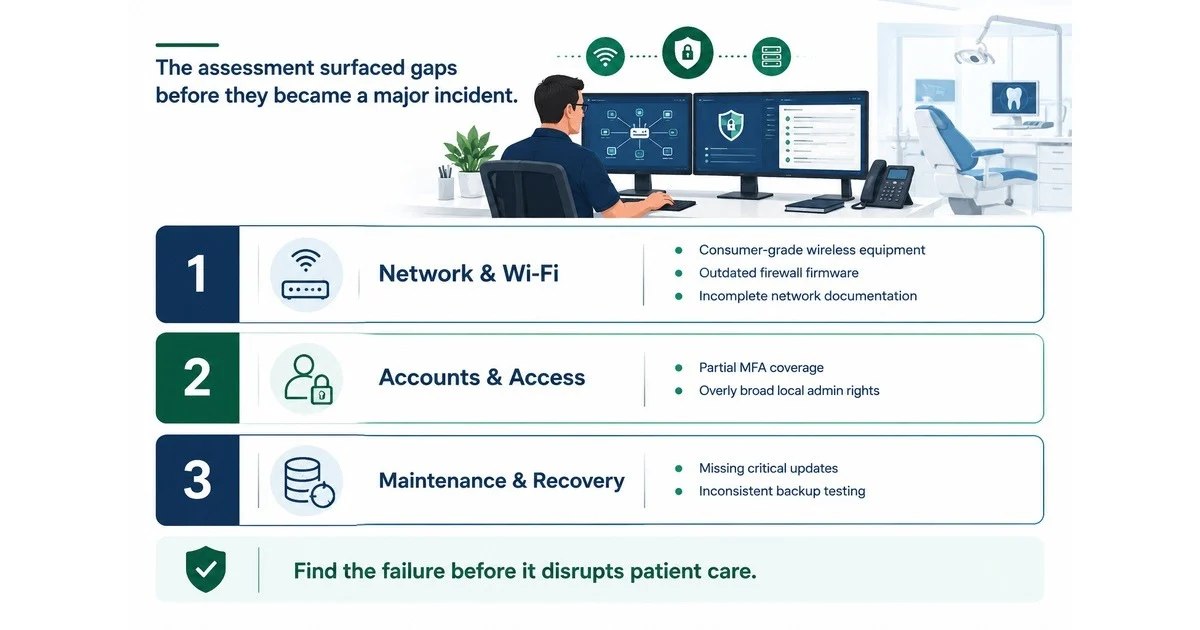
RJ PRO reviewed the network, wireless performance, endpoint health, patch status, user accounts, Microsoft 365 security, backups, and disaster recovery readiness. The findings fell into three areas, revealing that the problems staff experienced were only part of the picture.
Network and infrastructure
– Consumer-grade wireless equipment that was no longer adequate
– Outdated firewall firmware, a security concern separate from the Wi-Fi trouble
– Incomplete documentation of network equipment
Accounts and access
– Multi-factor authentication (MFA) is only partly in place, so some accounts had no second verification step
– Local administrator privileges are broader than daily work requires, which magnifies the damage a compromised account can do
Maintenance and recovery
– Critical security updates missing on some workstations
– Inconsistent backup testing
None of these issues had caused a significant incident. Together, though, they added both operational and cybersecurity risk.
Rebuilding in Five Phases Around the Appointment Schedule
RJ PRO phased the work to limit disruption to patient appointments.
Phase 1: Rebuilding the Network Foundation
Inadequate wireless equipment and outdated firewall firmware were separate problems, so the network was redesigned around a business-class firewall, managed switches, and enterprise-grade wireless access points.
RJ PRO also improved network segmentation and added a secure guest Wi-Fi network. Both generally help keep visitor devices away from the systems that hold patient information, though neither is a guarantee of data security on its own.
Phase 2: Closing Account and Email Security Gaps
With MFA only partly in place, RJ PRO implemented it for Microsoft 365. Advanced email filtering, endpoint detection and response, DNS filtering, continuous security monitoring, and updated security policies followed.
Together, these controls aim to lower the practice’s exposure to phishing, ransomware, and unauthorized access. No set of controls removes that risk completely.
Phase 3: Taking Patching Off the To-Do List
Updates had depended on someone remembering to install them, and some workstations were missing critical fixes. RJ PRO automated patch management and software updates, turning an inconsistent chore into a repeatable process.
Next came workstation monitoring, disk health checks, and hardware alerts, which help spot developing problems earlier.
Phase 4: Making Recovery Testable
The backup setup was rebuilt around encrypted local backups, secure cloud replication, automated verification, and recovery testing, and the recovery procedures were written down.
A backup job that finishes is not proof that records can be restored. Testing is how a practice finds out before an emergency forces the question, and even then it doesn’t guarantee a successful recovery.
Phase 5: Preparing Staff for Phishing and Password Risks
Staff were trained to recognize phishing, handle passwords, protect patient information, secure their devices, work remotely with care, and report incidents. Training complements technical safeguards, but it cannot eliminate human error.
What Changed and What Staff Reported
The practice reported these results within the first several months after implementation. They are qualitative and were generally described collectively rather than attributed to individual changes, so the table pairs related items without implying cause.
|
Before RJ PRO |
Implemented change |
Reported outcome |
|
Frequent wireless problems; consumer-grade equipment |
Enterprise-grade access points, managed switches, business-class firewall |
Reported: faster, more consistent connectivity |
|
Slow logins; inconsistent workstation performance |
Workstation monitoring, disk health checks, hardware alerts, alongside the network redesign |
Reported: noticeably faster logins, fewer technology interruptions, significantly fewer recurring workstation problems |
|
Partial MFA; limited security protections |
MFA for Microsoft 365, email and DNS filtering, endpoint detection and response |
Control implemented. No separate outcome documented |
|
Manual updates and maintenance |
Automated patch management and software updates |
Reported: reduced administrative burden, more consistent maintenance |
|
Inconsistent backup testing |
Encrypted local and cloud backups, automated verification, recovery testing |
Reported: greater confidence that critical systems could be restored |
|
Limited visibility into network health |
Continuous security monitoring |
Control implemented. No separate outcome documented |
What the Changes Meant for Staff and Management
Front-office staff spent less time troubleshooting computers, and clinical staff reached patient records and imaging faster. These are reported observations rather than measured results.
The change in management approach may matter more over the long run. The practice has moved toward proactive planning: it follows a technology roadmap and meets regularly with RJ PRO to review performance, cybersecurity trends, and business goals. That makes IT an ongoing relationship rather than a one-time equipment replacement.
Better support for the practice’s HIPAA security requirements was among the reported outcomes. IT controls can support compliance, but they don’t establish or guarantee it, and the practice stays responsible for its obligations.
Valley Springs Dental Practices: Questions Worth Asking About Your Own IT
Other dental practices can use this engagement to identify similar gaps in their own IT. RJ PRO is based in Valley Springs and serves dental practices here. Many small practices have no in-house IT team, so support needs to cover both remote troubleshooting and onsite visits when equipment needs hands-on attention.
Dental IT services typically cover practice-management software, digital X-ray systems, sensors, intraoral cameras, and the network that ties them together.
You can check your own IT support for dental offices against five questions drawn from this case:
- Are Wi-Fi and network equipment reliable throughout the practice?
- Is MFA enabled for the relevant accounts, with administrator access restricted appropriately?
- Are operating systems and applications patched consistently?
- Are backups tested through actual recovery procedures?
- Is there a documented process for monitoring, maintaining, and supporting critical dental software and imaging equipment?
These are prompts for self-assessment, not findings about any specific practice.
What RJ PRO Offers Dental Practices
These points describe RJ PRO’s own healthcare offering, separate from the outcomes reported above:
- Healthcare-focused managed service provider based in Valley Springs
- Security services that include access controls, encryption of protected health information, audit logging, and risk assessments
- A help desk the website describes as available around the clock, every day of the year
- 24/7/365 monitoring, plus scheduled after-hours updates to limit interruptions during office hours
- Flat monthly pricing
RJ PRO also provides IT support for medical practices, with services suited to their specific technology and operational needs.
Learn more about what sets RJ PRO apart.
Questions From Dental Practice Managers
What do dental IT services typically include?
Network and Wi-Fi management, workstation maintenance, cybersecurity, backup and disaster recovery, help desk support, and support for practice-management software and imaging equipment.
How can IT support help a dental practice address HIPAA Security Rule requirements?
A provider can help put technical safeguards in place, such as access controls and audit logging. Compliance also involves risk analysis, policies, and training, and it remains the practice’s responsibility.
Can an IT provider support dental practice management and imaging software?
RJ PRO’s healthcare page lists support for dental software, including Open Dental, Dentrix, Eaglesoft, and Curve Dental, as well as digital X-ray systems, sensors, and intraoral cameras. Confirm compatibility for your specific software versions and devices before you commit to any provider.
Why should a dental practice test its backups?
A recovery test shows whether records and applications can actually be brought back and whether your written procedures hold up before you need them.
Can a practice get remote and onsite IT support?
Yes. RJ PRO provides both for businesses in Valley Springs. Many issues can be handled remotely, and technicians visit when the work needs hands-on attention.
Review Your Practice’s IT With RJ PRO
If your dental practice is in Valley Springs, RJ PRO can talk through your network reliability, maintenance, cybersecurity, and backup recovery questions on a free discovery call.
Call (209) 920-4077, email help@rj-pro.net, book a discovery call, or visit rj-pro.net.