
How RJ PRO Strengthened Backup and Cybersecurity for a Sutter Creek CPA Firm

Each time the shared drive and tax software stopped working at an 11-person Sutter Creek CPA firm, the team lost most of a morning. The outages also exposed a deeper problem: the firm’s backups had never been restore-tested, so no one could say how much data would come back if it were ever lost.
RJ PRO Tech Group spent five weeks, mostly after hours, strengthening the firm’s backup arrangements, access controls, network and monitoring. The aim was a firm that could test its recovery process and manage IT risk instead of relying on assumptions.
Client Snapshot
|
Industry |
Accounting and Tax Services (CPA firm) |
|
Location |
Sutter Creek, California (Amador County) |
|
Company Size |
11 employees, one historic Main Street office |
|
Services Involved |
Managed IT, Cybersecurity, Network Care, Desktop Care, Backup & Disaster Recovery |
|
Project Length |
Five weeks, most work done after hours |
Technology Environment: Microsoft 365 · 16 workstations · on-site file server · QuickBooks · Drake Tax
The Challenge: Outages in the Busiest Weeks
Accounting firms handle confidential financial information throughout the year, with workloads often intensifying around tax deadlines and clients’ reporting requirements. For this Sutter Creek firm, recurring outages made it harder to keep work moving during busy periods.
For years, its IT support came from a part-time contact who helped only when someone called. That was workable in quiet months. In the previous busy season, this arrangement was no longer workable.
– The shared drive and tax software stopped working several times, and each outage cost most of a morning.
– Computers slowed whenever several people used the tax software together.
– Staff shared logins, and nearly everyone could open every client folder.
– Tax returns and other private documents travelled as ordinary email attachments.
– An email that looked like it came from a longtime client almost led the firm to change payment details. The team caught it in time.
These problems were linked. Aging equipment made outages more likely, no one was watching for warning signs, and the firm’s only safety net was a set of backups it had never tried to restore.
The RJ PRO Assessment
RJ PRO reviewed the firm’s computers, server, network, Microsoft 365 accounts, email, backups, software and security paperwork. It found:
– Untested, exposed backups. Nobody had checked that they worked, and ransomware that reached the corporate network could have destroyed the backup files along with the live data.
– Old equipment and one internet connection. The server and a few computers were too old, updates were inconsistent, and a single connection failure could stop work.
– No monitoring and no written plan. Nobody was watching for suspicious activity, and the firm had no written information security plan.
The Solution: A Staged Rollout, Mostly After Hours
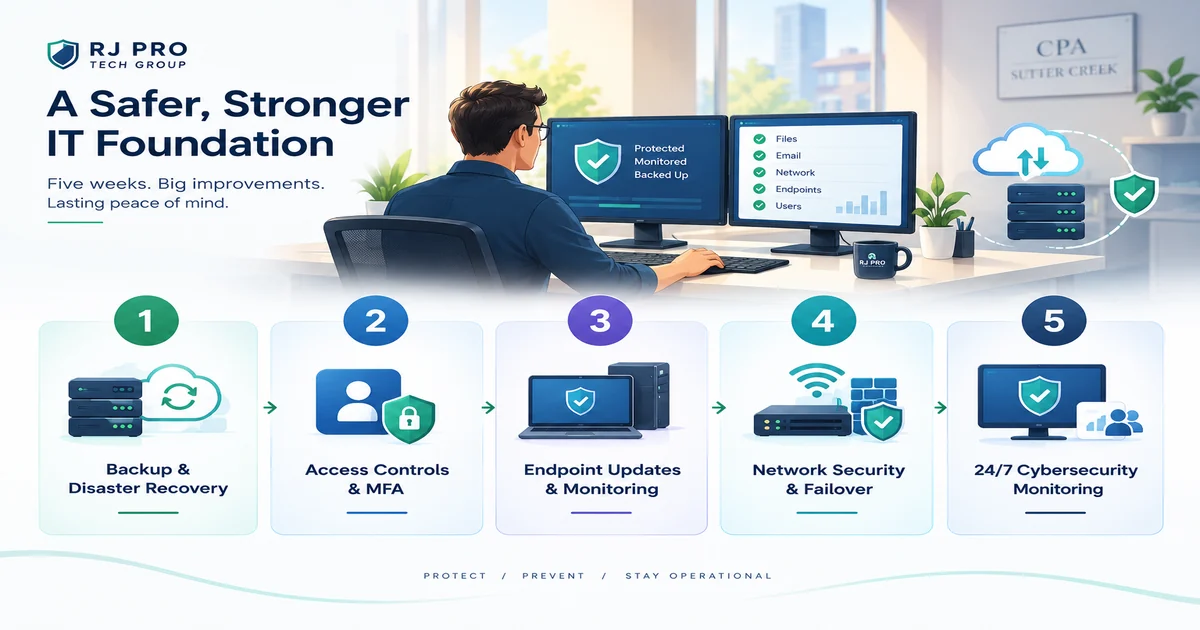
RJ PRO scheduled the work around the firm’s busiest dates and made most changes after office hours to limit disruption. The project took five weeks in total. That is the length of the improvement work, not a recovery time.
1. Backups kept apart and tested
The weakness: untested backups that an attack on the network could reach.
The change: through Backup & Disaster Recovery, the firm now keeps encrypted backups on-site and in the cloud, separated from the main network. RJ PRO also tests restores on a regular schedule.
Why it matters: separation lowers the chance that one incident takes out both live data and its copies, though it doesn’t remove ransomware risk. A restore test is evidence that the backups tested actually work.
2. Individual accounts and restricted access
The weakness: shared logins and open client folders.
The change: every employee has an individual account with multi-factor authentication (MFA), and access follows each person’s role.
Why it matters: if one account is compromised, individual accounts, MFA and role-based permissions limit what it can reach and make activity traceable to a person.
3. Encrypted documents and Microsoft 365 settings
The weakness: private documents sent as ordinary email attachments.
The change: The firm now uses encrypted file sharing for client documents, reducing the risks associated with sending sensitive records as ordinary email attachments. RJ PRO also tightened the firm’s Microsoft 365 settings.
4. Updated computers and a planned server
The weakness: old equipment and patchy updates.
The change: Desktop Care now keeps the firm’s computers updated and monitored, which is the everyday layer of what RJ PRO’s endpoint security services cover more broadly. RJ PRO also began regular server check-ups and prepared a replacement plan that spreads the cost over several budgets.
Why it matters: current systems leave fewer security gaps, and a planned replacement avoids one large purchase.
5. A managed firewall and a second connection
The weakness: one shared network and one internet connection.
The change: through Network Care, RJ PRO installed a managed firewall, separated guest Wi-Fi from office systems, and added a second internet connection that takes over automatically if the first fails.
Why it matters: guest devices no longer share a network with the server, and one failed link is less likely to stop work.
6. Monitoring, email protection and training
The weakness: basic email filtering and no one watching for suspicious activity.
The change: RJ PRO added stronger email protection, security software that spots unusual behaviour, 24/7 managed monitoring, and phishing training for staff. The monitoring falls under what RJ PRO offers as cybersecurity monitoring services. RJ PRO also wrote down the firm’s security practices.
Why it matters: monitoring helps identify problems earlier, and written practices support compliance reviews.
What Changed
|
Area |
Before RJ PRO |
After RJ PRO |
|
Backups |
Never tested; exposed to the main network |
Encrypted on-site and cloud copies, separated, with scheduled restore tests |
|
Access |
Shared logins, open folders |
Individual accounts, MFA, role-based access |
|
Client documents |
Plain email attachments |
Encrypted file sharing |
|
Computers and server |
Old, inconsistently updated |
Managed updates and monitoring, server check-ups, replacement plan |
|
Network |
One shared network, one connection |
Managed firewall, separate guest Wi-Fi, automatic failover |
|
Monitoring |
None |
24/7 managed monitoring and phishing training |
|
Security documentation |
No written plan |
Documented security practices |
|
IT support |
Reactive, part-time |
Proactive managed support |
Business Impact Beyond the Table
Backups versus tested recovery. Having backups means copies exist. Tested recovery gives the firm evidence about what those copies can restore, which matters for a practice built on QuickBooks, Drake Tax and client folders.
Shared logins versus individual access. Individual accounts let the firm trace activity to a person and remove access when someone leaves. Shared credentials offered neither.
Reactive versus proactive support. The firm moved from a contact who helped when called to a managed arrangement with scheduled updates, monitoring and server check-ups, which helps surface problems before they interrupt work.
No provider can stop every threat or guarantee a restore. RJ PRO’s work reduces risk and improves visibility.
Why Recovery-Ready IT Matters for Sutter Creek Professional Offices
A CPA office holds Social Security numbers, bank details, and payroll records, whatever its size, and backups, access, equipment, and monitoring depend on each other.
A managed firewall, a separate guest network, and a failover connection are the working parts of network security services for small businesses, and they limit how far one fault or intrusion can spread.
Aging servers, shared logins, and open folders tend to stay hidden until something breaks. RJ PRO lists vulnerability assessment services among its general cybersecurity offerings, and this kind of review helps find such gaps early.
RJ PRO’s IT services for financial companies apply this approach to CPA and finance practices.
RJ PRO Services Behind This Work
The six changes above were the documented work for this firm. RJ PRO’s wider offering goes further, and not all of it was used here:
– Managed IT covers help desk, monitoring, updates, and planning.
– Cybersecurity brings together RJ PRO’s managed cybersecurity services, including email security, multi-factor authentication, and security awareness training.
Frequently Asked Questions
Why are untested backups a problem?
A backup can finish every night and still fail to restore because of missing files, a misconfigured job or a corrupted copy. Without a test, nobody knows what would come back.
Why separate backups from the main network?
Ransomware and hardware failures can affect everything on one network. Encrypted copies kept apart, on-site and in the cloud, make it less likely that one incident takes out both live data and backups.
What does restore testing establish?
A restore test checks that files are usable and that the recovery steps work at that moment. It turns an assumption into evidence, but it can’t guarantee every future recovery.
How do access controls and monitoring complement backups?
Individual accounts, multi-factor authentication and role-based access reduce what a stolen password can reach. Monitoring helps flag suspicious activity sooner. Together they lower the chance of needing a restore, and backups cover what they miss.
What should a professional office check about its recovery readiness?
Check where backups are stored, whether they are separated from the main network, when a restore was last tested, and which systems must return first.
Could Your Office Restore Its Data?
Before the next outage, make sure your backups are separated from the main network, your restore process has been tested and your team knows which systems need to return first. RJ PRO can review your backup arrangements, recovery priorities and IT weaknesses, then explain its findings and recommended next steps.
Book your free discovery call or contact RJ PRO directly:
– Email: help@rj-pro.net
– Phone: (209) 920-4077
Explore more case studies or learn about RJ PRO’s Managed IT services.