

Ransomware doesn’t send a calendar invite. It arrives on an ordinary Tuesday, usually through an email that looked entirely reasonable, and within minutes every file your business depends on is encrypted and unreachable. Payroll, client records, project files, accounting history, the estimate you were finishing — all of it, locked behind a screen demanding payment.
The question that matters in that moment isn’t whether you’d pay. It’s simpler and considerably more uncomfortable: could you open for business tomorrow?
For most El Dorado Hills businesses we assess, the honest answer is no. Not because anyone was careless, but because they have backups — and they assume backups and recovery are the same thing.
They aren’t. That gap is where businesses lose weeks.
What the first 24 hours actually look like
Most people picture ransomware as a single dramatic moment. In practice it unfolds as a sequence, and understanding that sequence is what makes the difference between a controlled response and a chaotic one.
Hour zero. Someone opens an attachment or enters credentials on a page that looked like your Microsoft 365 login. Nothing visible happens. This is the part almost nobody notices.
Days one through thirty. The attacker is inside, quietly. They map your network, identify where valuable data lives, find your backup system, and escalate their access. Modern ransomware operators often spend weeks in an environment before triggering anything. This dwell time matters enormously for reasons we’ll come back to.
The trigger. Encryption runs — typically overnight or over a weekend, when nobody is watching. It moves across mapped drives, shared folders, and any connected backup storage it can reach.
Morning. Staff arrive. Nothing opens. The first assumption is a server problem. It takes most businesses somewhere between thirty minutes and two hours to understand what has actually happened.
The first decisions. Who do you call? Do you shut everything down? Is the attacker still inside? Do you have to notify anyone? Can you make payroll on Friday? Most businesses are making these decisions for the first time, under pressure, without a plan.
The discovery. Somewhere in the first day, someone checks the backups. This is the moment that determines everything that follows — and it’s the moment most businesses discover that what they had wasn’t what they thought.
Backup is not recovery
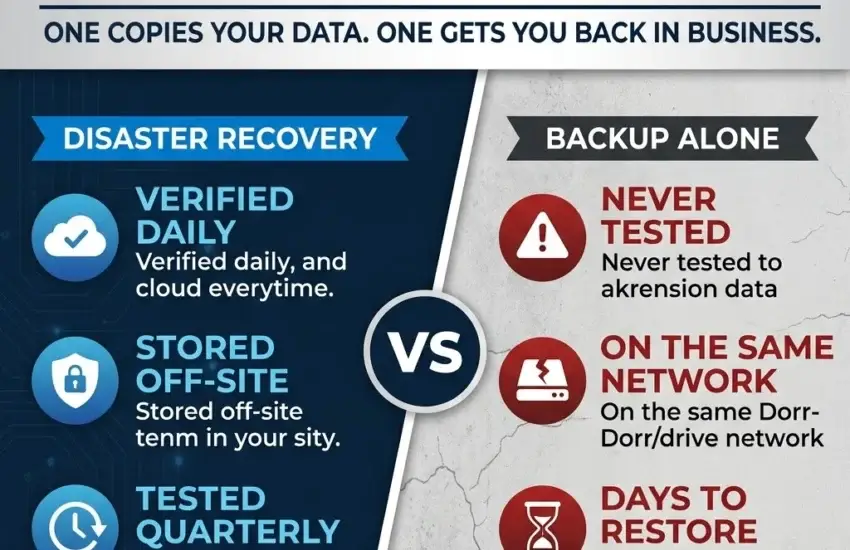
A backup is a copy of your data. Recovery is getting your business functioning again — systems running, staff logged in, phones answered, clients served.
Plenty of businesses have the first without the second, and the reasons are consistent enough that we can list them.
Backups that were never tested. They run nightly, the log reports success, and nobody has ever attempted an actual restore. When it’s finally attempted under pressure, the files are corrupt, incomplete, or missing the one database that mattered. A backup job reporting success only confirms that the job ran, not that the data inside is usable.
Backups sitting on the same network. This is the most common and most damaging failure. If your backup drive is reachable from an infected machine, ransomware will find it and encrypt it. Modern variants specifically hunt for connected backup storage, because attackers know that a business with working backups doesn’t pay. Your backup being on the network is not a safety net — it’s a target.
Only one recovery point. Remember the dwell time. If an attacker was inside your systems for three weeks before triggering encryption, a backup from last night may already contain their tools. Businesses with a single restore point sometimes recover successfully, then get encrypted again a week later from the same infection they restored.
Missing systems entirely. The file server gets backed up. The accounting database, the line-of-business application configuration, email settings, and the workstation that quietly runs a critical scheduled task do not. You restore your files and discover you still can’t operate.
No sequence for recovery. Even when every byte of data is intact, restoring it across servers and workstations takes planning. Which system comes first? What depends on what? Without a documented order, recovery becomes improvisation, and improvisation takes days.
The two numbers that define your exposure
There are two measurements that determine what an incident actually costs you, and most business owners have never been asked about either.
RTO — Recovery Time Objective. How long can you be down before the damage becomes serious? For an accounting firm in March, that might be hours. For a design firm between project milestones, perhaps a day or two.
RPO — Recovery Point Objective. How much work can you afford to lose? If your last usable backup is from midnight, and the attack triggers at 4pm, you’ve lost a full day of work across your entire team. For some businesses that’s an inconvenience; for others it’s unrecoverable.
These two numbers should drive every decision about backup design. In practice, most businesses have a backup arrangement that was set up years ago, has never been revisited, and delivers an RTO and RPO nobody has ever calculated.
Working these out is genuinely useful even if you change nothing else. It converts a vague worry into a specific number you can decide whether to accept.
What recovery costs when it goes wrong
The ransom payment is rarely the largest figure. For a small or mid-sized El Dorado Hills business, the real costs stack quickly.
Downtime. A week offline for a twenty-five person business isn’t only a week of lost revenue. It’s a week of payroll paid for work that couldn’t happen, plus the backlog that follows, plus the overtime spent clearing it.
Emergency response. Incident response specialists, forensics, and after-hours labour are expensive precisely because you need them urgently.
Client trust. Explaining to clients that their information was exposed, or that their project has stalled indefinitely, causes damage that outlasts the technical recovery considerably.
Compliance exposure. If you handle medical, financial, or legal information, a breach carries notification obligations and potential penalties on top of everything else.
Insurance complications. Cyber insurers increasingly require documented controls — Multi-Factor Authentication, monitored backups, endpoint protection. Claims have been reduced or denied where a business attested to controls it didn’t actually have in place. The application form is a legal document.
Repeat incidents. Businesses that recover without identifying how the attacker got in, and without removing their persistence, are frequently hit again within months.
What real disaster recovery looks like
A recovery plan worth having has five properties. If yours is missing any of them, it’s an assumption rather than a plan.
1. Backups are verified automatically, every day. Not “the job completed,” but “the data was checked and confirmed restorable.” This verification should happen without anyone remembering to look, and it should raise an alarm when it fails.
2. Copies live off-site, beyond reach of your network. Cloud replication means an attacker who compromises your office still can’t touch the copy that saves you. This single structural difference separates businesses that recover from businesses that negotiate.
3. Multiple recovery points span enough time. Given typical dwell times, you want the ability to go back weeks, not just to last night. Multiple restore points let you find a clean one.
4. Recovery is tested on a schedule. Quarterly testing converts assumption into fact. A real test means actually restoring systems and confirming they function — not verifying that backup files exist. It’s also what lets you answer an insurer or auditor with evidence.
5. The plan is written down. Who to call, in what order, what gets restored first, how staff are told, what clients are told. Written before the incident, because nobody thinks clearly at 7am on the worst morning of their working year.
Our Backup & Disaster Recovery service is built around exactly these five points — monitored, verified, replicated, tested, and documented — so recovery becomes something you can demonstrate rather than hope for.
What a real recovery test actually involves
“We test our backups” means very different things to different providers, and the difference is worth understanding before you accept the reassurance.
The weakest version is checking that backup jobs completed and that files appear in the backup set. This confirms almost nothing. Corrupted data backs up perfectly well.
A better version restores a handful of individual files to confirm they open correctly. Useful, but it tells you nothing about whether an entire server would come back, or how long it would take.
A genuine test restores complete systems into an isolated environment and confirms they actually run — the server boots, the database opens, the application launches, users can log in. It measures how long each step took, so your RTO stops being a guess. And it documents what was tested, when, by whom, and what the results were.
That documentation matters more than most businesses realise. It’s what you produce when an insurer asks, when a client’s due diligence questionnaire arrives, or when an auditor wants evidence rather than assurance. A test that happened but wasn’t recorded is nearly as unhelpful as one that never happened.
The right frequency for most businesses is quarterly. Environments change — new applications, new servers, new dependencies — and a recovery plan validated eighteen months ago describes a business that no longer exists.
Why this matters particularly in El Dorado Hills
There’s a specific pattern we see across the region worth naming.
El Dorado Hills has a high concentration of professional service firms — engineering practices, financial advisors, medical and dental offices, architecture studios, law firms — that grew steadily and capably without ever building an IT function. Technology was handled by whoever was most comfortable with it, supplemented by a break-fix vendor called in when something failed.
That arrangement works reasonably well for years. It handles printers and password resets and the occasional failed hard drive. What it doesn’t do is prepare a business for a coordinated attack, because break-fix is by definition reactive, and there’s nobody watching during the weeks an attacker spends quietly mapping your network.
The second pattern is that these firms hold genuinely sensitive data. Client financial records, patient information, privileged legal files, engineering designs representing years of work. The data is valuable enough to be worth attacking, while the defenses often reflect the business the firm was five years ago rather than the one it is now.
Neither of these is a criticism. Growth outpacing infrastructure is the normal condition of a successful business. But it does mean the gap between what a firm holds and what protects it tends to widen quietly until something forces the issue.
Recovery is the last line, not the first
It’s worth saying plainly: the goal is never to need any of this.
Layered cybersecurity — endpoint detection and response, Multi-Factor Authentication across every account, email threat filtering, DNS security, and automated patching — prevents the substantial majority of incidents from ever starting. Continuous monitoring catches unusual activity during that quiet dwell period, when an attacker is inside but hasn’t triggered anything yet. That window is the single best opportunity to stop an attack, and it’s invisible to businesses without monitoring.
Disaster recovery is what stands behind all of that. Prevention reduces how often you need it. Recovery determines what happens on the day prevention doesn’t hold.
The questions to ask this week
You don’t need a technical background to pressure-test your own position. Ask whoever manages your IT:
- When did we last perform an actual test restore — not a backup, a restore? What was the date?
- Where is our off-site copy, and could ransomware on our network reach it?
- How many recovery points do we keep, and how far back can we go?
- Realistically, in hours, how long would full recovery take?
- Which systems are not covered by our current backups?
- If this happened tonight, who gets called, and in what order?
If the answers are vague, that vagueness is the finding. It is also, fortunately, fixable.
Deciding in advance
Businesses that survive ransomware aren’t luckier than those that don’t. They made this decision months earlier, when there was time to think properly. By the time the screen goes red, every option available to you was determined by choices already made.
RJ PRO Tech Group works with El Dorado Hills businesses to close that gap — verified backups, off-site replication, tested recovery, documented plans, and proactive protection that reduces the odds you ever need any of it. When something does go wrong, our Help Desk responds in minutes rather than days.
Schedule a complimentary IT assessment for your El Dorado Hills business. We’ll test what you currently have and tell you plainly whether it would hold.


